What an AI Agent Feature Actually Costs to Build in 2026
Every founder we talk to has an AI feature on the roadmap. Almost none of them have priced the second invoice — the one that arrives every month and grows with every new user. Here is the whole number, with the maths shown.
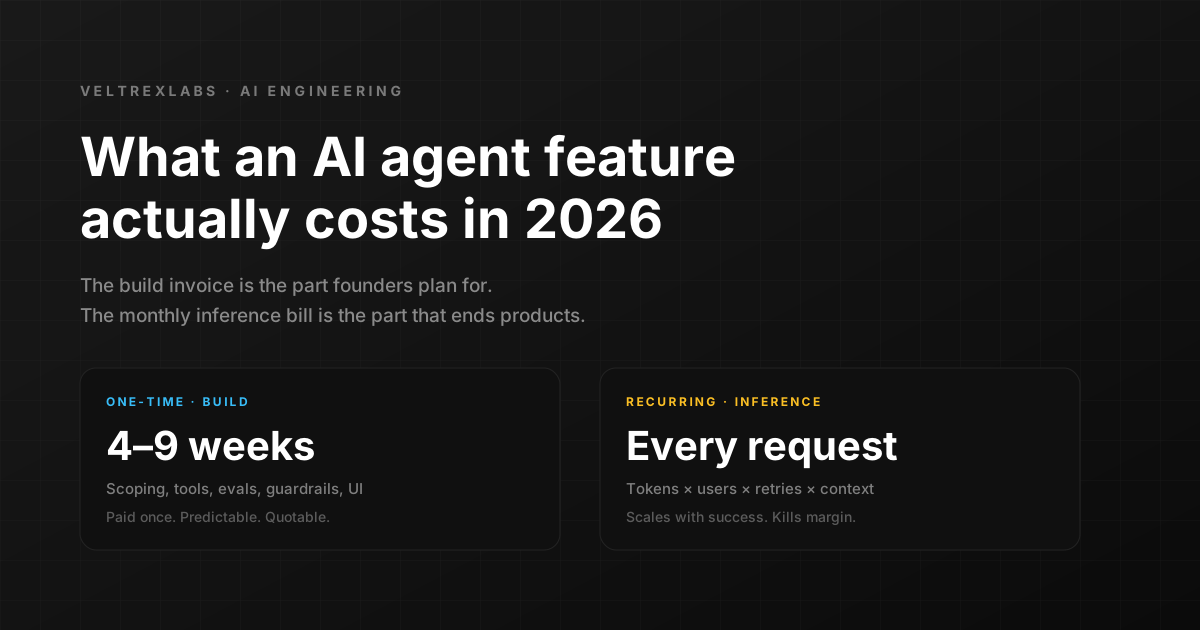
Every discovery call we have taken since January has included some version of the same sentence: we want to add an AI agent. Sometimes it is a support assistant. Sometimes it is a research agent that reads a customer database. Sometimes it is genuinely just a smarter search box wearing a costume. The next question is always the same too: what will it cost?
The honest answer is that the question has two halves, and most agencies only quote one of them. You get a build number — a proposal, a timeline, a fixed fee. What you do not get is the number that arrives on the first of every month afterwards and grows in direct proportion to how well the feature is doing. We have watched teams celebrate a successful launch and then quietly turn the feature off ninety days later because nobody modelled that second number.
So here is the full picture, with the arithmetic shown, from thirteen AI features we have shipped and maintained for clients this year.
Two invoices, not one
The first invoice is the build: scoping, integrations, evaluation harness, guardrails, the interface. It is a one-time, predictable, quotable number, and it is the one every proposal talks about.
The second invoice is inference. Every time a user triggers the feature, you pay for the tokens the model reads and the tokens it writes. That cost scales with usage, with conversation length, with how much context you stuff into each request, and with how many times the agent loops before it finishes. It is a cost of goods sold, and it belongs in your margin model, not in your engineering budget.
Stop asking what the AI feature costs to build. Ask what it costs per user per month at ten times your current traffic. If that number is bigger than what those users pay you, the feature is not a feature — it is a subsidy with a nice interface.
Invoice one: where the build hours actually go
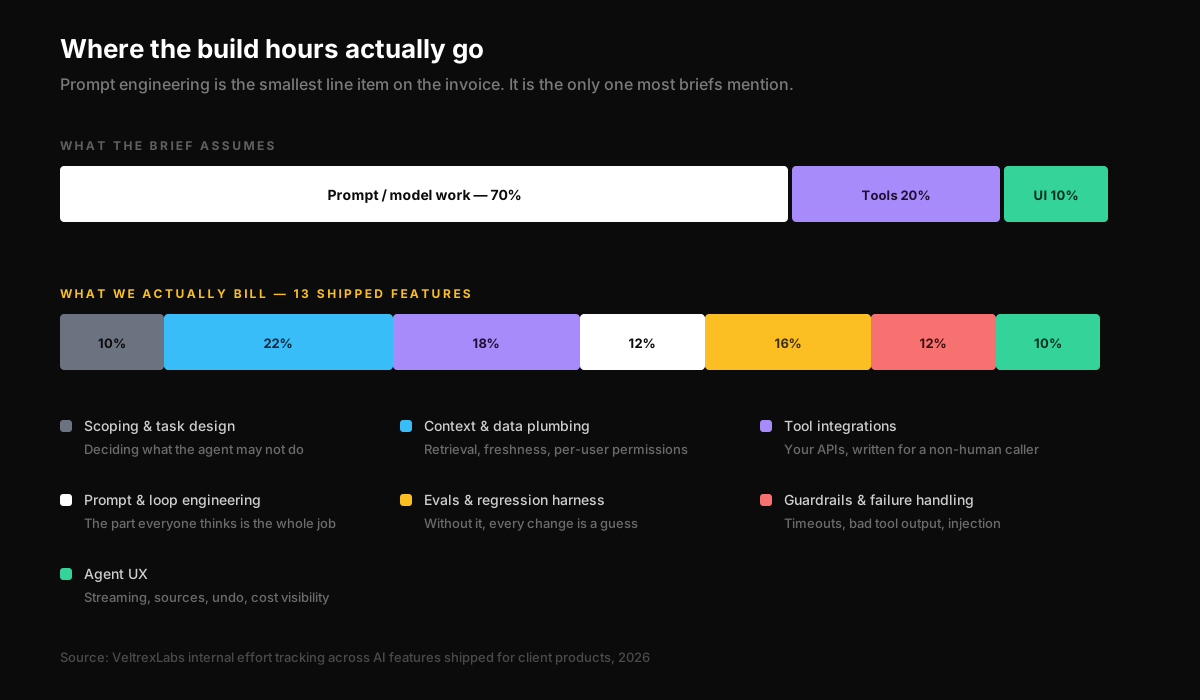
Almost every brief we receive describes the work as prompt engineering. Write a good prompt, hook it to the product, ship. If that were true, an AI feature would take a week and no agency would be needed for it.
It is not true, and the gap is not small. Across the features we have delivered, prompt and loop engineering accounts for roughly an eighth of the effort. The rest is the unglamorous work of making a probabilistic system behave predictably inside a product that has real users, real permissions, and a real support inbox.
The three line items founders never budget for
- 1.Permission-aware retrieval. The agent has to read your data — but only the rows this specific user is allowed to see. Every retrieval query needs the same access rules as your API, and getting that wrong is a data breach, not a bug.
- 2.An evaluation suite. Without a scored test set, every prompt change is a coin flip. You cannot tell improvement from regression by trying three examples by hand, and the model provider will ship a new version whether you are ready or not.
- 3.Failure handling. Rate limits, timeouts, a tool that returns garbage, a user who tries to talk the agent out of its instructions. The feature has to degrade into something useful rather than something broken.
None of that shows up in a demo. All of it shows up in week three of production. When an agency quotes an AI feature in two weeks, this is the work they have left out, and you will pay for it later at a worse hourly rate under deadline pressure.
Three tiers, three very different numbers
AI feature is not one thing. The word covers a range that spans an order of magnitude in effort. These are the three bands we actually quote against.
| Tier | What it does | Typical build | What drives the number |
|---|---|---|---|
| Assisted field | Summarises, drafts or classifies inside a screen the user is already on | 2 to 3 weeks | One model call, no tools, low blast radius |
| Workflow agent | Completes a multi-step task using three to eight of your systems, with a human approving the result | 5 to 8 weeks | Tool integrations and the evaluation harness |
| Autonomous agent | Runs unattended and writes to production systems on its own | 10 to 16 weeks | Guardrails, audit trail, rollback, permissions |
The most useful thing a founder can do before requesting a quote is decide which of those three rows they are actually asking for. Most teams describe row three and need row one.
Invoice two: the bill that arrives every month
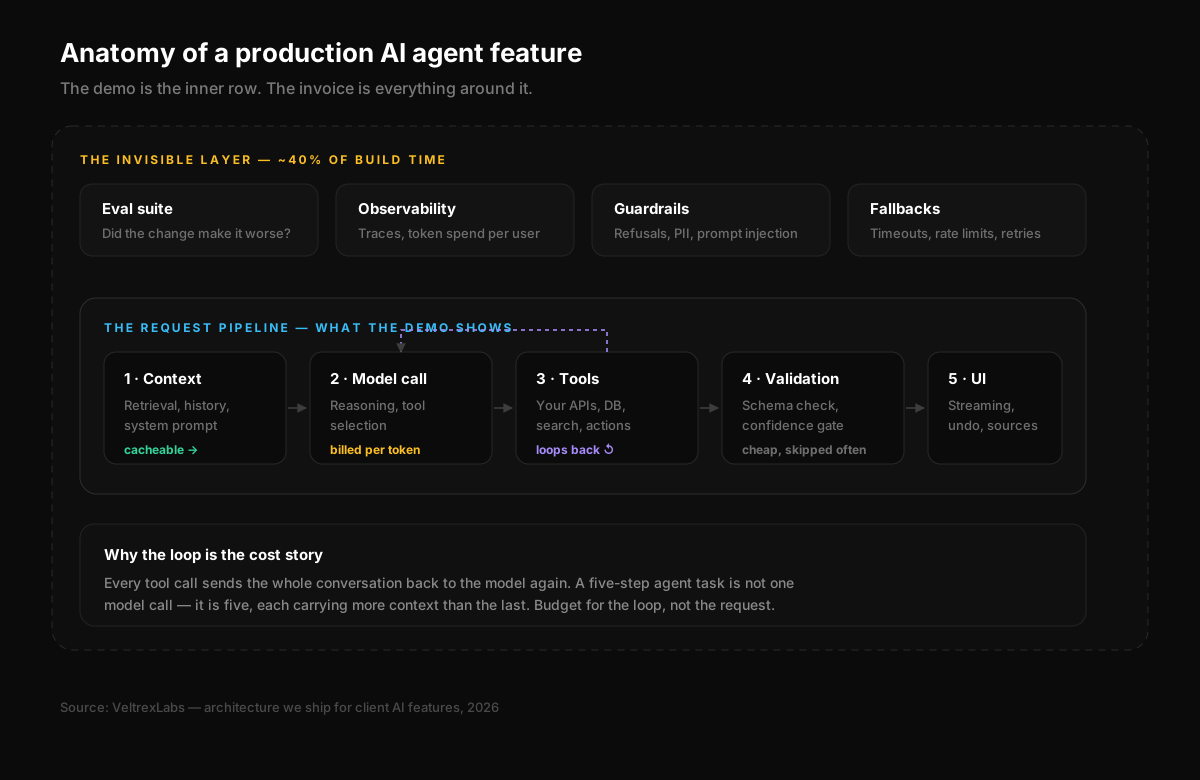
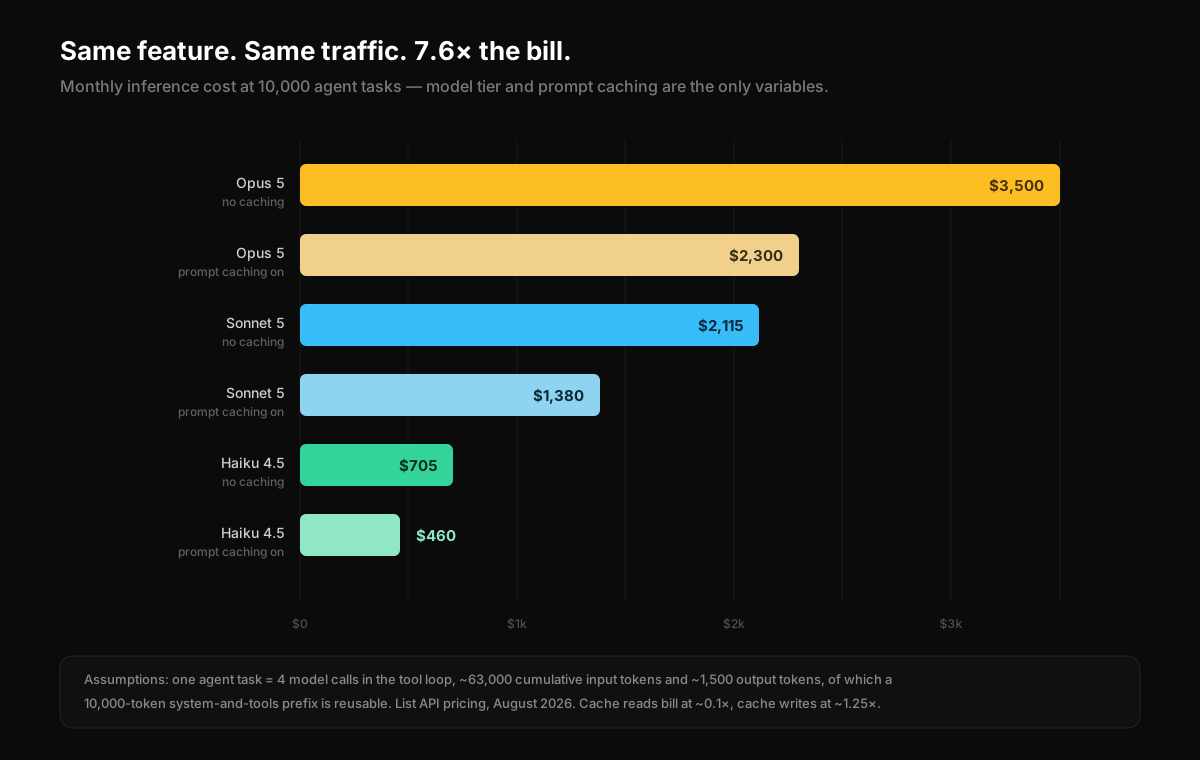
Now the part that decides whether the feature survives. Take a realistic workflow agent: a user asks a question, the agent pulls context from your database, calls two or three tools, and writes an answer. In practice that is about four model calls in a single task, because every tool result goes back to the model along with everything that came before it.
Add it up and one task consumes roughly 63,000 cumulative input tokens and about 1,500 output tokens. That is a normal, unremarkable agent task — not a pathological one. Here is what that costs at ten thousand tasks a month, which is a modest amount of traffic for a product that people like.
| Configuration | Per task | 10,000 tasks / month | 100,000 tasks / month |
|---|---|---|---|
| Frontier model, no caching | $0.35 | $3,500 | $35,000 |
| Frontier model, prompt caching on | $0.23 | $2,300 | $23,000 |
| Mid-tier model, prompt caching on | $0.14 | $1,380 | $13,800 |
| Small model, prompt caching on | $0.05 | $460 | $4,600 |
That is a 7.6x spread on an identical feature. Nobody changed the product. Nobody changed the prompt. The difference is entirely engineering decisions that are invisible from the outside and nearly impossible to retrofit once the feature is live and people depend on how it behaves.
Four levers that move the monthly number
1. Route by difficulty, not by default
In every agent we have measured, most requests are easy. Classify this, extract that, answer a question the retrieved document already answers plainly. Sending all of them to your most capable model is like couriering every letter. Route the straightforward path to a small fast model, escalate the hard ones, and measure the split — in a support agent we shipped this spring, 71 percent of requests never needed the expensive model at all.
2. Cache the part of the prompt that never changes
Your system prompt, tool definitions and reference documents are identical on every request. Sent naively, you pay full price for them every single time, four times per task. Mark that prefix as cacheable and repeat reads bill at roughly a tenth of the rate. The catch is architectural: caching is a prefix match, so stable content has to come first and anything volatile — timestamps, the user question, session identifiers — has to come last. Teams that put the current date at the top of the system prompt silently pay full price forever and never find out why.
3. Cap the loop before it caps you
An agent that can call tools can call tools forever. A confused agent retrying the same failing lookup eleven times costs eleven times as much as a successful one and produces nothing. Every agent we ship has a maximum step count, a token budget for the task, and a defined behaviour when it hits either — usually handing back to a human with what it has learned so far.
4. Batch anything the user is not waiting for
Nightly enrichment, document classification, backfills, digest generation — none of that needs a synchronous response. Batch processing runs the same requests asynchronously at half the cost. If a meaningful share of your AI workload is not latency sensitive and you are still running it through the live path, you are paying a 100 percent premium for speed nobody perceives.
Before any AI feature we ship reaches production, it reports cost per user and cost per task on a dashboard the founder can read. Not tokens — money. A team that can see the number will manage it. A team that gets a surprise invoice will kill the feature instead.
The five questions we ask before we quote
- 1.What happens when it is wrong? A wrong draft email is an inconvenience. A wrong refund is money. The answer sets the entire guardrail budget.
- 2.How many times will one user trigger this per month? This is the only input that turns a per-task cost into a business decision.
- 3.Whose data does it read, and who is allowed to see that data? If the answer is complicated, retrieval will be the largest line item on the build.
- 4.Can you show us twenty examples of a good answer and twenty of a bad one? If not, we cannot evaluate the thing, which means we cannot improve it or prove it works.
- 5.Who owns this in six months? Models change, your data changes, your prompts drift. Someone has to re-run the evaluations. If the answer is nobody, build something simpler.
When we tell clients not to build it
We turn down AI work more often than we take it, and it is almost always for one of these reasons.
- A deterministic rule would do the job. If the logic fits in a dozen if-statements, it does not need a model, and the model will be slower, costlier and less reliable at it.
- Nobody can define correct. If two people on the founding team disagree about what a good output looks like, no prompt will resolve that argument.
- The volume is too low to matter. Forty requests a month does not justify an evaluation harness, an observability layer, and an ongoing maintenance commitment.
- The underlying data is a mess. Retrieval cannot fix a knowledge base nobody has updated in two years. It will confidently quote the outdated version.
- It is really a search box. A lot of AI feature requests are a well-built search experience with an expensive chat interface bolted on top.
“The teams that win with AI features are not the ones with the best prompts. They are the ones who knew their cost per user in week two and designed around it.”
How we scope AI features at VeltrexLabs
Our process for AI work runs the same five phases as every other product we build, with two additions. Before the build starts, we write the evaluation set — the examples that define success — because it is the only artefact that makes the rest of the work measurable. And before launch, we model the unit economics at ten times current traffic and put that number in front of the founder in writing.
If the model says the feature is unprofitable at scale, we would rather find that out in week one, on a spreadsheet, than in month four, on an invoice. Sometimes the answer is a cheaper model. Sometimes it is a narrower feature. Occasionally it is a different business model, because the feature is genuinely worth what it costs and should be priced accordingly.
The AI layer does not sit on its own — it sits on top of a stack of decisions you made earlier. Here is the stack we ship on in 2026, and the parts of it we dropped.
Read: The 2026 startup stackIf you are pricing an AI feature right now and the second invoice is a blank in your model, that is the conversation we are best at having. Bring us the workflow and your expected volume, and we will show you the arithmetic before anyone signs anything.
Frequently asked questions
How much does it cost to build an AI agent?
It depends entirely on what the agent is allowed to do. An assisted field that summarises or drafts inside an existing screen takes two to three weeks. A workflow agent using three to eight of your systems takes five to eight weeks. An autonomous agent that writes to production systems unattended takes ten to sixteen weeks, because consequence — not cleverness — drives the number.
What does it cost to run an AI agent every month?
In our worked example of 10,000 agent tasks per month, the same feature costs between $460 and $3,500 depending only on which model tier answers the request and whether prompt caching is enabled. Nobody changed the product; that 7.6x spread is entirely engineering decisions.
How can I reduce AI agent running costs?
Four levers move the number the most: route easy requests to a smaller model rather than sending everything to your most capable one, cache the part of the prompt that never changes, cap the tool loop with a maximum step count and token budget, and batch anything the user is not actively waiting for.
Why is my AI feature more expensive than expected?
Because one user task is rarely one model call. Every tool call sends the whole conversation back to the model again, so a five-step agent task is five model calls, each carrying more context than the last. Teams budget for the request and get billed for the loop.
When should you not build an AI feature?
When a deterministic rule would do the job, when nobody on the team can define what a correct answer looks like, when the volume is too low to justify an evaluation harness and ongoing maintenance, when the underlying data is out of date, or when the request is really a well-built search experience with a chat interface bolted on.
Tejas Patel
Founder & CEO, VeltrexLabs
Tejas is the Founder & CEO of VeltrexLabs, a product-focused development agency that has shipped MVPs for 13+ startups across food-tech, SaaS, e-commerce, and enterprise software.
Continue reading


Ready to Transform Your Digital Presence?
Take the first step towards digital success with VeltrexLabs by your side. Our team of experts is eager to craft tailored solutions that drive growth for your business. Whether you need a stunning website, a powerful mobile app, or a data-driven marketing campaign, we've got you covered. Let's embark on this transformative journey together.
Unlock Your Digital Potential Today
